Environment : Websphere 6.1 Vertical Cluster, 2 JVMS
I have websphere servers which time travel in the future. Normally we don’t go forward over an year which is what SSL is valid for but when we cross that date we have problems. The application state changes to “unknown” as nodeagent fails to communicate with dmgr.
Please also read GSK_ERROR_BAD_CERT error configuring SSL between Plug-in and Application Server V6.1


When I tried synchronizing Node Agent with JVMs it returned following error message

When I tried synchronizing Node Agent with JVMs it returned following error message The nodeagent log flashed following messages : tail -f /opt/IBM/WebSphere/AppServer/profiles/Profile01/Node/logs/nodeagent/SystemOut.log
[12/04/11 06:58:23:313 BST] 00000017 WSX509TrustMa E CWPKI0311E: The certificate with subject DN CN=172.30.9.24, O=IBM, C=US has a start date Fri Aug 12 01:35:46 BST 2011 which is valid after the current date/time. This will can happen if the client’s clock is set earlier than the server’s clock. Please verify the clocks are in sync between this client and server and retry the request. Forwarded IOR failed with: CAUGHT_EXCEPTION_WHILE_CONFIGURING_SSL_CLIENT_SOCKET: JSSL0080E: javax.net.ssl.SSLHandshakeException – The client and server could not negotiate the desired level of security. Reason: com.ibm.jsse2.util.h: Certificate not valid yet
Easy Solution :
Create new set of SSL certificate else change sysdate to SSL valid date and restart websphere services
If you can’t pickup easiest solution then long process to correct this issue is below:
I have this issue today again when system was moved to date in the future. Since I have some time in hand , lets find out where things are going wrong.
DMGR LOG ERROR : /opt/IBM/WebSphere/AppServer/profiles/Profile01/dmgr/logs/dmgr/SystemOut.log
[10/23/11 6:42:06:982 BST] 0000001f ORBRas E com.ibm.ws.security.orbssl.WSSSLClientSocketFactoryImpl createSSLSocket ProcessDiscovery : 0 JSSL0080E: javax.net.ssl.SSLHandshakeException – The client and server could not negotiate the desired level of security. Reason: com.ibm.jsse2.util.h: No trusted certificate found javax.net.ssl.SSLHandshakeException: com.ibm.jsse2.util.h: No trusted certificate found
NODE LOG Error : /opt/IBM/WebSphere/AppServer/profiles/Profile01/Node/logs/nodeagent/SystemOut.log
[10/23/11 6:42:07:228 BST] 0000001c SystemOut O CWPKI0022E: SSL HANDSHAKE FAILURE: A signer with SubjectDN “CN=Server1.domain.com, O=IBM, C=US” was sent from target host:port “172.30.9.63:8879”. The signer may need to be added to local trust store “/opt/IBM/WebSphere/AppServer/profiles/Profile01/Node/config/cells/Server1_Cell/trust.p12” located in SSL configuration alias “NodeDefaultSSLSettings” loaded from SSL configuration file “security.xml”. The extended error message from the SSL handshake exception is: “No trusted certificate found”.
[10/23/11 6:42:07:228 BST] 0000001c SystemOut O
[10/23/11 6:42:07:238 BST] 0000001c ServiceLogger I com.ibm.ws.ffdc.IncidentStreamImpl initialize FFDC0009I: FFDC opened incident stream file /opt/IBM/WebSphere/AppServer/profiles/Profile01/Node/logs/ffdc/nodeagent_0000001c_11.10.23_06.42.07_0.txt
We need to locate how many keystore (key.p12 or similar) are there under WAS profile.
$ find /opt/IBM/WebSphere/AppServer/profiles/Profile01 -name “key.p12” -type f -ls
738613 4 -rw-rw-r– 1 was61 was61 1554 Jul 13 2010 ./dmgr/etc/key.p12
738621 4 -rw-rw-r– 1 was61 was61 2810 Oct 23 02:02 ./dmgr/config/cells/Server1Cell/key.p12
738624 4 -rw-rw-r– 1 was61 was61 2802 Jul 13 2010 ./dmgr/config/cells/Server1Cell/nodes/Server1Node01/key.p12
1098641 4 -rw-rw-r– 1 was61 was61 1554 Jul 13 2010 ./Node/etc/key.p12
1098643 4 -rw-rw-r– 1 was61 was61 2802 Oct 7 2010 ./Node/config/cells/Server1Cell/key.p12
1098646 4 -rw-rw-r– 1 was61 was61 2802 Jul 13 2010 ./Node/config/cells/Server1Cell/nodes/Server1Node01/key.p12
From the list above it’s clear there is a diff between files at DMGR & Cell level. You can open those keystores using ikeyman to look at SSL certificates in them.
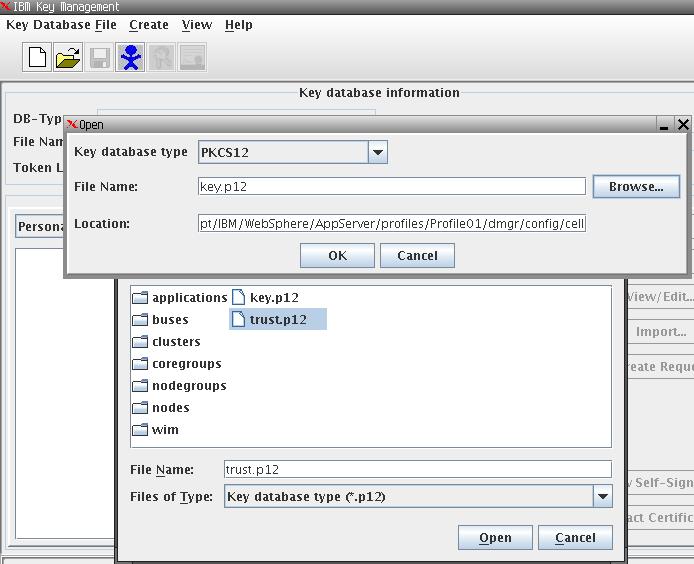
The master key file here is ./dmgr/config/cells/Server1Cell/key.p12 so I need to manually copy it at other dmgr locations but not NODEAGENT directories.
[was61@ Profile01]$ cp ./dmgr/config/cells/Server1Cell/key.p12 ./dmgr/config/cells/Server1Cell/nodes/Server1Node01/key.p12
[was61@ Profile01]$ cp ./dmgr/config/cells/Server1Cell/key.p12 ./dmgr/etc/key.p12
[was61@ Profile01]$ find . -name “key.p12” -type f -ls
212994 4 -rw-rw-r– 1 was61 was61 2810 Oct 24 00:07 ./dmgr/etc/key.p12
738621 4 -rw-rw-r– 1 was61 was61 2810 Oct 23 02:02 ./dmgr/config/cells/Server1Cell/key.p12
738624 4 -rw-rw-r– 1 was61 was61 2810 Oct 24 00:06 ./dmgr/config/cells/Server1Cell/nodes/Server1Node01/key.p12
1098641 4 -rw-rw-r– 1 was61 was61 1554 Jul 13 2010 ./Node/etc/key.p12
1098643 4 -rw-rw-r– 1 was61 was61 2802 Oct 7 2010 ./Node/config/cells/Server1Cell/key.p12
1098646 4 -rw-rw-r– 1 was61 was61 2802 Jul 13 2010 ./Node/config/cells/Server1Cell/nodes/Server1Node01/key.p12
[was61@Server1 Profile01]$ alias dmgrlog
alias dmgrlog=’tail -f /opt/IBM/WebSphere/AppServer/profiles/Profile01/dmgr/logs/dmgr/SystemOut.log’
[was61@Server1 Profile01]$ alias nodelog
alias nodelog=’tail -f /opt/IBM/WebSphere/AppServer/profiles/Profile01/Node/logs/nodeagent/SystemOut.log’
[was61@Server1 Profile01]$ rm /opt/IBM/WebSphere/AppServer/profiles/Profile01/Node/logs/nodeagent/SystemOut.log
[was61@Server1 Profile01]$ /opt/IBM/WebSphere/AppServer/profiles/Profile01/dmgr/bin/startManager.sh
ADMU0116I: Tool information is being logged in file
/opt/IBM/WebSphere/AppServer/profiles/Profile01/dmgr/logs/dmgr/startServer.log
ADMU0128I: Starting tool with the dmgr profile
ADMU3100I: Reading configuration for server: dmgr
ADMU3200I: Server launched. Waiting for initialization status.
ADMU3000I: Server dmgr open for e-business; process id is 17088
[was61@Server1 Profile01]$ cd /opt/IBM/WebSphere/AppServer/profiles/Profile01/Node/bin/
[was61@Server1 bin]$ ./syncNode.sh Server1 8879
ADMU0116I: Tool information is being logged in file
/opt/IBM/WebSphere/AppServer/profiles/Profile01/Node/logs/syncNode.log
ADMU0128I: Starting tool with the Node profile
*** SSL SIGNER EXCHANGE PROMPT ***
SSL signer from target host 172.30.9.63 is not found in trust store /opt/IBM/WebSphere/AppServer/profiles/Profile01/Node/etc/trust.p12.
Here is the signer information (verify the digest value matches what is displayed at the server):
Subject DN: CN=Server1.domain.com, O=IBM, C=US
Issuer DN: CN=Server1.domain.com, O=IBM, C=US
Serial number: 1319331734885809000
Expires: Sun Oct 21 02:02:14 BST 2012
SHA-1 Digest: F2:BD:CB:E8:28:0B:66:2E:EA:1C:71:BE:0F:D7:24:BB:16:98:54:FF
MD5 Digest: 72:94:EC:FC:9B:10:1A:1E:B6:DF:AA:21:F5:FF:3A:23
Add signer to the trust store now? (y/n) y
A retry of the request may need to occur if the socket times out while waiting for a prompt response. If the retry is required, note that the prompt will not be redisplayed if (y) is entered, which indicates the signer has already been added to the trust store.
ADMU0401I: Begin syncNode operation for node Server1_Node01 with
Deployment Manager Server1: 8879
ADMU0016I: Synchronizing configuration between node and cell.
ADMU0402I: The configuration for node Server1_Node01 has been synchronized
with Deployment Manager Server1: 8879
Start NodeAgent now and look at nodeagent log for any SSL errors
[was61@Server1 bin]$ /opt/IBM/WebSphere/AppServer/profiles/Profile01/Node/bin/startNode.sh
ADMU0116I: Tool information is being logged in file
/opt/IBM/WebSphere/AppServer/profiles/Profile01/Node/logs/nodeagent/startServer.log
ADMU0128I: Starting tool with the Node profile
ADMU3100I: Reading configuration for server: nodeagent
ADMU3200I: Server launched. Waiting for initialization status.
ADMU3000I: Server nodeagent open for e-business; process id is 17660
Let’s compare again key SSL files at different directoriesunder dmgr & nodeagent
[was61@Server1 Profile01]$ find . -name “key.p12” -type f -ls
212994 4 -rw-rw-r– 1 was61 was61 2810 Oct 24 00:07 ./dmgr/etc/key.p12
738621 4 -rw-rw-r– 1 was61 was61 2810 Oct 23 02:02 ./dmgr/config/cells/Server1_Cell/key.p12
738624 4 -rw-rw-r– 1 was61 was61 2810 Oct 24 00:06 ./dmgr/config/cells/Server1_Cell/nodes/Server1_Node01/key.p12
1098641 4 -rw-rw-r– 1 was61 was61 1554 Jul 13 2010 ./Node/etc/key.p12
1098643 4 -rw-rw-r– 1 was61 was61 2810 Oct 23 02:02 ./Node/config/cells/Server1_Cell/key.p12
1098646 4 -rw-rw-r– 1 was61 was61 2810 Oct 24 00:06 ./Node/config/cells/Server1_Cell/nodes/Server1_Node01/key.p12
Serverstatus returned following SUCCESSFUL status:
ADMU0116I: Tool information is being logged in file
/opt/IBM/WebSphere/AppServer/profiles/Profile01/Node/logs/serverStatus.log
ADMU0128I: Starting tool with the Node profile
ADMU0503I: Retrieving server status for all servers
ADMU0505I: Servers found in configuration:
ADMU0506I: Server name: server_member2
ADMU0506I: Server name: server_member1
ADMU0506I: Server name: ihs-prpc
ADMU0506I: Server name: nodeagent
ADMU0508I: The Application Server “server_member2” is STARTED
ADMU0508I: The Application Server “server_member1” is STARTED
ADMU0508I: The Web server “ihs-prpc” is RUNNING
ADMU0508I: The Node Agent “nodeagent” is STARTED
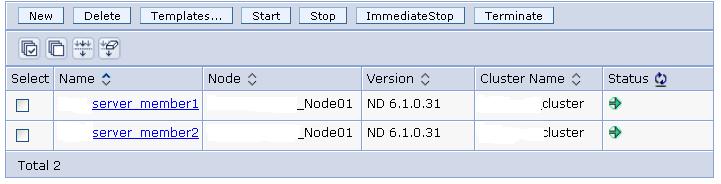
Individual JVMs are working OK. Status is Green than “unknown” listed previously.
DMGR LOG ERROR :
[10/23/11 6:42:06:982 BST] 0000001f ORBRas E com.ibm.ws.security.orbssl.WSSSLClientSocketFactoryImpl createSSLSocket ProcessDiscovery : 0 JSSL0080E: javax.net.ssl.SSLHandshakeException – The client and server could not negotiate the desired level of security. Reason: com.ibm.jsse2.util.h: No trusted certificate found javax.net.ssl.SSLHandshakeException: com.ibm.jsse2.util.h: No trusted certificate foundNODE LOG Error
[10/23/11 6:42:07:228 BST] 0000001c SystemOut O CWPKI0022E: SSL HANDSHAKE FAILURE: A signer with SubjectDN “CN=eugbbopg11lt.appsdmz.pinnacle.net, O=IBM, C=US” was sent from target host:port “172.30.9.63:8879”. The signer may need to be added to local trust store “/opt/IBM/WebSphere/AppServer/profiles/Profile01/Node/config/cells/eugbbopg11lt_Cell/trust.p12” located in SSL configuration alias “NodeDefaultSSLSettings” loaded from SSL configuration file “security.xml”. The extended error message from the SSL handshake exception is: “No trusted certificate found”.
[10/23/11 6:42:07:228 BST] 0000001c SystemOut O
[10/23/11 6:42:07:238 BST] 0000001c ServiceLogger I com.ibm.ws.ffdc.IncidentStreamImpl initialize FFDC0009I: FFDC opened incident stream file /opt/IBM/WebSphere/AppServer/profiles/Profile01/Node/logs/ffdc/nodeagent_0000001c_11.10.23_06.42.07_0.txt

 Tweet
Tweet
